
HITGuard Release August 2025/en: Unterschied zwischen den Versionen
Weitere Optionen
Isan (Diskussion | Beiträge) Die Seite wurde neu angelegt: „==NEW IN RISK MANAGEMENT== ===New features in the protection needs analysis=== This release focused heavily on revising and expanding various functions of the protection needs analysis (PNA). On the one hand, we have revised the creation of the protection needs analysis, and on the other hand, you can now create and send out revaluations for protection needs analyses manually or automatically.<p>When should I create a new PNA and when should I conduct a r…“ |
Isan (Diskussion | Beiträge) Die Seite wurde neu angelegt: „===New mappings in existing standards=== The following mapping has been corrected in EN ISO/IEC 27001:2022: Chapter 8.1 27001 now refers to chapters 45, 46, 47, 48 KRITIS catalog of measures. Previously, this mapping originated from chapter A.8.1. 27001.<p> EN ISO/IEC 27001:2022 now contains outgoing mappings to the following standards: *VDA ISA 6.0 *ISO 27002:2022 *DORA - Digital Operations Resilience Act *NIS-2 IT Act - Annex to Implementing Regulation…“ |
||
| (30 dazwischenliegende Versionen desselben Benutzers werden nicht angezeigt) | |||
| Zeile 4: | Zeile 4: | ||
This release focused heavily on revising and expanding various functions of the protection needs analysis (PNA). On the one hand, we have revised the creation of the protection needs analysis, and on the other hand, you can now create and send out revaluations for protection needs analyses manually or automatically.<p>When should I create a new PNA and when should I conduct a reassessment? In practice, the first PNAs are usually conducted as interviews with the respondents. This allows the procedure to be discussed together and questions to be clarified in person. For future PNAs, regular, e.g., annual, reassessments of the same resources and/or data categories can simply be sent out as self assessments. This saves time for everyone involved and ensures that your analyses are up to date. The new workflow plans will support you in this in the future. | This release focused heavily on revising and expanding various functions of the protection needs analysis (PNA). On the one hand, we have revised the creation of the protection needs analysis, and on the other hand, you can now create and send out revaluations for protection needs analyses manually or automatically.<p>When should I create a new PNA and when should I conduct a reassessment? In practice, the first PNAs are usually conducted as interviews with the respondents. This allows the procedure to be discussed together and questions to be clarified in person. For future PNAs, regular, e.g., annual, reassessments of the same resources and/or data categories can simply be sent out as self assessments. This saves time for everyone involved and ensures that your analyses are up to date. The new workflow plans will support you in this in the future. | ||
====Restructuring of the creation of a new protection needs analysis==== | |||
= | The process of creating a new protection needs analysis (PNA) under Risk management > Protection needs has been changed so that all data category and resource assignments are now made in step 2. This harmonizes the PNA with the gap analysis, in which the review objects are also added in step 2. | ||
::[[Datei:SBA_Neuanlage.png|left]] <br clear=all> | ::[[Datei:SBA_Neuanlage.png|left]] <br clear=all> | ||
The first button allows you to control whether you want to evaluate suggested resources and data categories with the current PNA. Those that are currently not linked to any open PNA, but are linked to at least one closed PNA or via a new link from the structural analysis, are suggested. Any existing historical results can also be transferred here, if such results exist from previous PNAs. | |||
====Reassessment of a protection needs analysis==== | |||
= | As with gap analyses and review results, there is now also a button (with an upward arrow) for protection needs analyses (PNAs) under Risk Management > Protection needs, which can be used to create a reassessment at the touch of a button. | ||
::[[Datei:Neubewerten_Button.png|left]] <br clear=all> | |||
The master data, participants, and linked resources and data categories are transferred from the selected closed PNA. The results of the previous PNA can also be adopted for the new review. All you have to do is specify the time period for the new PNA, and the reassessment is already prepared based on the old PNA. | |||
::[[Datei:Neubewerten_Button.png|left]] <br clear=all> | ::[[Datei:Neubewerten_Button.png|left]] <br clear=all> | ||
====Workflow planning for automated reassessments of protection needs analyses==== | |||
=== | Under Risk Management > Protection needs, there is a new option to create workflow plans. This allows protection needs analyses (PNAs) to be created automatically on a recurring basis as self assessments and sent to the interview partner. There is a new button (purple, far right) that takes the user to an overview of the workflows that have been created. | ||
::[[Datei:WFP_Button.png|left]] <br clear=all> | ::[[Datei:WFP_Button.png|left]] <br clear=all> | ||
::[[Datei:SBA_WFP_Übersicht_RN.png|left]] <br clear=all> | ::[[Datei:SBA_WFP_Übersicht_RN.png|left]] <br clear=all> | ||
Once there, create a new workflow plan with Plus, copy an existing one with the Copy button, or open an existing one by double-clicking on it. It makes sense to divide PNAs into several workflow plans so that they can be revaluated throughout the year, e.g., some in the spring and some in the fall. In the example above, PNAs with Sales are assigned more often than those with Research & Development. However, you can also assign PNAs to individual departments with multiple workflow plans. For example, if you have a workflow plan for the spring and one for the fall, you can assign PNAs to the spring plan. However, you can also assign PNAs with individual departments to multiple workflow plans. For example, if you have created a workflow plan for spring and one for fall that are repeated annually and you want to check a particularly sensitive organizational unit twice a year (in spring and fall), you can assign the PNA to this organizational unit in both workflow plans.<p> | |||
As with a control definition, the next execution and repetition behavior of the workflow is defined in the master data. | |||
::[[Datei:SBA_WFP_Definition_RN.png|left]] <br clear=all> | ::[[Datei:SBA_WFP_Definition_RN.png|left]] <br clear=all> | ||
In the Protection needs analyses tab, you add the desired initial PNAs on the basis of which the reassessments are to be created. If there are conflicts, this is indicated by a yellow or red warning triangle and the problem is described so that you can resolve the conflict or adjust the workflow accordingly.<p> | |||
You can find more information about conflicts [[Special:MyLanguage/Schutzbedarf#Schutzbedarfsanalysen|here]]. | |||
::[[Datei:WFP_SBAs_mit0Konflikt.png|left]] <br clear=all> | ::[[Datei:WFP_SBAs_mit0Konflikt.png|left]] <br clear=all> | ||
At this point, you also have the option of manually triggering a reassessment of the PNA by using the same button as in the overview under Risk Management > Protection needs (arrow button on the far right).<p> | |||
One week before the workflow is executed, the person responsible receives a reminder e-mail with all the important information, including any problems. This gives them enough time to resolve conflicts, such as PNAs that still need to be closed.<p> | |||
When the workflow is triggered, the person responsible also receives information about what has happened. This means that they receive information about successful mailings and mailings that could not be sent due to unresolved conflicts. This information can then also be found in the Completed workflows tab.<p> | |||
Workflows | Workflows can also be paused for individual organizational units or processes. This can be useful if, for example, you have carried out an unscheduled reassessment shortly before triggering the workflow plan and do not want to send out a new request immediately. In this case, triggering is skipped and the protection needs analysis is only included in the workflow again the next time it is triggered.<p> | ||
If the workflow can be executed without any problems and is not paused, a new protection needs analysis is created as a self assessment, with or without the results of the previous version, depending on the configuration, and sent directly to the interview partner. The start date is the current date of dispatch and the response deadline is based on the deadline or end date of the PNA that served as a template. In the above example, only one PNA was created and sent because the other was paused. The requested PNA can now be answered and returned by the interview partner like any other self assessment. | |||
::[[Datei:WFP_neueSBA.png|left]] <br clear=all> | ::[[Datei:WFP_neueSBA.png|left]] <br clear=all> | ||
====Workflow information in the protection needs analysis==== | |||
==== | Information about any workflow plans to which the protection needs analysis is linked is also available directly in the protection needs analysis itself. This also shows whether it is active or paused there. If the protection needs analysis was created from a workflow plan, this is also displayed. | ||
::[[Datei:SBA_Überprüfungsdetails_inkl_Workflow_hervorgehoben.png|left]] <br clear=all> | ::[[Datei:SBA_Überprüfungsdetails_inkl_Workflow_hervorgehoben.png|left]] <br clear=all> | ||
::<u> | ::<u>Tip:</u> You can also display information about whether a workflow is linked and when it will next be triggered in the overview of protection needs analyses by selecting the new column "Linked workflow plans" and „Next reassessment“. | ||
::[[Datei:SBA_Spalten.png|left]] <br clear=all> | ::[[Datei:SBA_Spalten.png|left]] <br clear=all> | ||
You can find more information about workflow plans [[Special:MyLanguage/Schutzbedarf#Workflowpläne|here]]. | |||
====Templates for naming protection needs analyses==== | |||
== | Another new feature in this context is the configuration of naming templates for protection needs analyses under Risk management > Settings. A template can be created from the elements OrgUnit/Process, Date, Free text, and Separator, which is then used to name all new assessments. | ||
::<u>Example:</u> Human Resources (HR) | SBA | 2025-08<p> | |||
::<u> | <b><i><u>Announcement:</i> For upcoming releases, we plan to gradually expand the workflow plan feature to include additional entities: Risk, Gap Analysis and Review result, and Processing activity.</i></b> | ||
<b><i><u> | |||
===New KPI "Risks/opportunities over time"=== | |||
For risk management, we have implemented the new "Risks/opportunities over time" key figure, which allows you to visualize the development of a risk/opportunity to date at the touch of a button.<p> | |||
Each risk/opportunity displayed is shown with its own development line, and the time period itself can be adjusted using the slider below the graph – just like the data filter for the control KPIs. Optionally, the background of the key figure can be colored using the colors of the risk matrix to identify the criticality of the various risks/opportunities even more quickly. | |||
::[[Datei:SA_KPI_RisikenZeitVerlauf.png|left]] <br clear=all> | ::[[Datei:SA_KPI_RisikenZeitVerlauf.png|left]] <br clear=all> | ||
The KPI is not part of the risk management dashboard by default, but can be added to a dashboard by dragging and dropping it from the list of available KPIs. | |||
===Transfer of justifications for revaluations of gap analyses and review results=== | |||
=== | Previously, when revaluating review objects, the answers (Yes, No, Partially, or the selected maturity level) could be transferred from the old to the new review. From now on, the reason entered can also be transferred using a new checkbox in the dialog. The familiar placeholder "Reason for last review still applies" is still available.<p> | ||
The option is available both when creating new assessments using the button in the overview list and in step 2 of the gap analyses when adding review objects. | |||
::[[Datei:BegründungÜbernehmen.png|left]] <br clear=all> | ::[[Datei:BegründungÜbernehmen.png|left]] <br clear=all> | ||
===New feature in the semi-automatic revaluation of gap analyses and review results=== | |||
=== | If you create a semi-automatic reassessment for multiple review objects from different reviews, these can be linked to different organizational units. HITGuard now creates a reassessment for each cluster of review objects that are linked to the same organizational unit. The revaluation is thus still assigned to the organizational unit, and these revaluated results can be taken into account in the evaluations by organizational unit.<p> | ||
Example: Measures have been completed that have a positive effect on gaps from review objects at TogetherExample AG, the HR department, and the R&D department. HITGuard now creates not one semi-automatic reassessment, but three: one for each organizational unit that contains the respective review objects. | |||
===Pre-assigning participants for gap and protection needs analyses=== | |||
When creating gap and protection needs analyses and also when recording review results, those responsible and interview partners are now preassigned via the organizational units or processes. The users who are stored as responsible persons in the organizational unit or process are used for this purpose. | |||
===Extension of risk reports to include threats and monetary impacts=== | |||
In the risk and opportunity reports, it is now possible to include the threats associated with the risk or opportunity in the report. In addition, any monetary impacts specified are also printed in the report – once summarized in the overview and then individually for each risk/opportunity. | |||
In | |||
===New measurement of RTO/RPO in the structural analysis and in the report=== | |||
== | Previously, the target and actual RTO and RPO were measured in the structure analysis by only including elements that were displayed. This behavior has now been changed so that elements are no longer viewed in isolation, but rather in their entirety across all relationships. | ||
::<u>Example:</u> I am in the organization view as the main view and have displayed the resources as a secondary view, which shows me the application level. The gross recovery time is the result of all linked resources below, including those that I have not displayed.<p> | |||
::<u> | The entire path is also taken into account in the structural analysis reports. | ||
==NEW IN SUPPLIER RISK MANAGEMENT== | |||
===Extension of supplier management=== | |||
=== | ====Supplier categories==== | ||
==== | Categories can now also be entered for suppliers. This makes them easier to filter and sort. The categories can be created separately or added directly when editing the supplier. | ||
::[[Datei:SRM_Lieferantenkategorien.png|left]] <br clear=all> | ::[[Datei:SRM_Lieferantenkategorien.png|left]] <br clear=all> | ||
::[[Datei:SRM_LieferantMitKategorien.png|left]] <br clear=all> | ::[[Datei:SRM_LieferantMitKategorien.png|left]] <br clear=all> | ||
====Master data and evaluation==== | |||
= | Supplier master data has been expanded to include supplier ratings. Here, you can record the score assigned, the protection needs class assigned, and your own metrics from third-party systems. Categories are also assigned or created here. Finally, it is also possible to enter a reason for the ratings assigned. | ||
::[[Datei:SRM_Lieferantenbewertung.png|left]] <br clear=all> | ::[[Datei:SRM_Lieferantenbewertung.png|left]] <br clear=all> | ||
====Expiration date and response deadlines==== | |||
==== | HITGuard now also warns you if there is a conflict between the response deadline for a supplier review and the expiration date of the corresponding supplier. If you request a response with a deadline that is after the expiration date or set an expiration date that is before a deadline, the system will notify you and you can adjust the data if necessary. | ||
HITGuard | |||
::[[Datei:SRM_LieferantDatum_quittieren.png|left]] <br clear=all> | ::[[Datei:SRM_LieferantDatum_quittieren.png|left]] <br clear=all> | ||
===Suppliers in the structural analysis=== | |||
If the add-on is activated, suppliers are now also included in the structural analysis. Here they can be displayed as the main or secondary view and linked to other entities. | |||
::[[Datei:Strukturanalyse_Lieferantensicht.png|left]] <br clear=all> | ::[[Datei:Strukturanalyse_Lieferantensicht.png|left]] <br clear=all> | ||
::[[Datei:Strukturanalyse_Lieferant.png|left]] <br clear=all> | ::[[Datei:Strukturanalyse_Lieferant.png|left]] <br clear=all> | ||
This allows you to visualize supplier risks and their protection needs with all their relationships and dependencies. The behavior is therefore identical to the behavior of other views. | |||
::[[Datei:Strukturanalyse_Lieferantenrisiko.png|left]] <br clear=all> | ::[[Datei:Strukturanalyse_Lieferantenrisiko.png|left]] <br clear=all> | ||
::<u> | ::<u>Example:</u> This allows systems used in the company to be visualized directly in relation to their suppliers. | ||
You can find more information on structural analysis [[Special:MyLanguage/Strukturanalyse|here]]. | |||
===Self assessments and interviews for suppliers=== | |||
===Self | With this release, you can now create interviews for supplier evaluations in addition to self assessments. This allows you to incorporate the results of a review yourself and avoid sending a request for a response to the supplier user if this is more in line with your process. | ||
::[[Datei:SRM_Interview_vs_SelfAssessment.png|left]] <br clear=all> | ::[[Datei:SRM_Interview_vs_SelfAssessment.png|left]] <br clear=all> | ||
===Easier identification of locked users=== | |||
If a supplier user tries to log in too many times with the wrong password, they will be locked out. This lockout is displayed to the supplier risk manager under Administration > Suppliers. As soon as the user has unlocked their account using the "Forgot password?" link, the badge disappears from the overview. | |||
::[[Datei:SRM_Lieferant_gesperrt.png|left]] <br clear=all> | ::[[Datei:SRM_Lieferant_gesperrt.png|left]] <br clear=all> | ||
==NEW IN AUDIT MANAGEMENT== | |||
===New "Appointments" page in the audit=== | |||
=== | There is an important new feature under Audit Management > Audit planning > Audits: the "Reviews" and "Schedule" pages have been merged in the audit and replaced by the new "Appointments" page, which combines the two tabs.<p> | ||
This new page shows a combined view of the audit calendar (with all dates, including other) and the assigned reviews as a list. If you select a review in the overview list, it is highlighted in the calendar with a bright border. | |||
::[[Datei:Audit_Termine_Seite_neu_RN.png|left]] <br clear=all> | ::[[Datei:Audit_Termine_Seite_neu_RN.png|left]] <br clear=all> | ||
===Download all appointments for an audit=== | |||
Starting with this release, all appointments belonging to an audit can be downloaded at once and imported into a calendar as appointments or meetings. | |||
::[[Datei:AM_AlleTermineHerunterladen.png|left]] <br clear=all> | ::[[Datei:AM_AlleTermineHerunterladen.png|left]] <br clear=all> | ||
This option is available in the audit calendars as well as on the new appointments page in the audit. | |||
===Extension of the audit report to include the score in numbers=== | |||
In the audit report, the overall score of the audit is now displayed not only graphically as a score line, but also as part of the table of header data for the audit. At the same time, the score is highlighted in color so that you can quickly see how the audit performed. | |||
::[[Datei:Auditbericht_Score.png|left]] <br clear=all> | ::[[Datei:Auditbericht_Score.png|left]] <br clear=all> | ||
===Update of the OrgUnit filter when creating audits=== | |||
== | The filter options "OrgUnit not audited in the last X years" and "Suggest auditing this OrgUnit in every audit program" have been harmonized across the various call locations (audit calendar, etc.). All audits of the current management system always serve as the data basis for filtering.<p> | ||
The first filter, "OrgUnit not audited in the last X years," grays out all OrgUnits that have been audited in the last X years. With the second filter, "Suggest auditing this OrgUnit in every audit program," every OrgUnit that has been checked in the audit information (under Administration > OrgUnits) and has not yet been used in the currently assigned audit program can be selected. | |||
::[[Datei:OE_Filter.png|left]] <br clear=all> | ::[[Datei:OE_Filter.png|left]] <br clear=all> | ||
A detailed explanation with examples can be found [[Special:MyLanguage/Auditkalender|here]]. | |||
==NEW IN MEASURES & CONTROLS== | |||
===New control type "Detective"=== | |||
=== | There is a new type of control parallel to preventive and corrective: detective. This type is intended for control definitions that are used to initially detect problems rather than prevent or correct them. The new control type is integrated into all KPIs and is also included in the reports. | ||
::[[Datei:PM_Kontrolltyp.png|left]] <br clear=all> | ::[[Datei:PM_Kontrolltyp.png|left]] <br clear=all> | ||
::[[Datei:PM_KPI_Kontrollkategorien.png|left]] <br clear=all> | ::[[Datei:PM_KPI_Kontrollkategorien.png|left]] <br clear=all> | ||
===Pre-assigning the person responsible for measures from the risk=== | |||
When a new measure is created in the context of a risk, its responsible person is preset as the person responsible for the risk, but can be adjusted manually. | |||
==NEW IN DATA PROTECTION== | |||
===External documents in the overview=== | |||
=== | If documents are stored for an external party in data protection, this information can now also be viewed in the overview of external parties. This makes it possible to quickly gain an overview of where documents are available and where they may still need to be created or uploaded. The column is displayed by default, but can be hidden at any time via the column selection. | ||
==NEW IN DOC MANAGEMENT== | |||
===Keyword tagging of stored documents=== | |||
=== | Documents stored in document management can now be tagged with keywords. This simplifies searching and filtering documents and allows for even more structure in the storage of files and links.<p> | ||
Keywords can be created and managed under Doc management > Documents | Keywords. In addition, keywords can also be created directly when editing a document entry and added to the collection. | |||
::[[Datei:DM_Schlagwörter2.png|left]] <br clear=all> | ::[[Datei:DM_Schlagwörter2.png|left]] <br clear=all> | ||
::[[Datei:DM_Schlagwörter.png|left]] <br clear=all> | ::[[Datei:DM_Schlagwörter.png|left]] <br clear=all> | ||
===Simultaneous download of multiple items=== | |||
We have expanded the download options in document management so that downloads are no longer limited to individual documents. It is now possible to download an entire folder and its subfolders or select multiple documents for download. When you do this, you will receive a zip file containing all selected items. Links are listed in a .txt file that is downloaded. | |||
::[[Datei:DownloadMehrereDokumente.png|left]] <br clear=all> | ::[[Datei:DownloadMehrereDokumente.png|left]] <br clear=all> | ||
===Advanced search/filtering in document management=== | |||
Document management now offers a new advanced search option. This allows documents to be searched not only by their file name, but also by their keywords and the linked chapters of standards/norms. In addition to the current folder, this search also searches all its subfolders. | |||
::[[Datei:DM_ErweiterteSuche_RN.png|left]] <br clear=all> | ::[[Datei:DM_ErweiterteSuche_RN.png|left]] <br clear=all> | ||
==GENERAL== | |||
===Extended functionality for archive reports=== | |||
=== | When creating a report with revision information in the report archive, the data classification can now not only be entered manually, but also selected from a drop-down menu. The data classes defined in the risk policy are available for selection.<p> | ||
If you create a report with revision information in the report archive as a PDF, the version number is automatically incremented. For example, the third PDF report created for a particular audit would automatically have the revision number 3. | |||
===New standards available=== | |||
The following new standards are available in HITGuard with this update: | |||
*NIS-2 IT Act - Annex to Implementing Regulation (EU) 2024/2690 | |||
*NIS-2 IT | |||
*DORA - Digital Operations Resilience Act | *DORA - Digital Operations Resilience Act | ||
*C5:2020 - | *C5:2020 - Cloud Computing Criteria Catalog | ||
You can import these standards under Administration > Standards and norms. | |||
The BSI IT-Grundschutz has been expanded to include chapter CON.11.2.<p> | |||
EN ISO/IEC 27001:2022 has been expanded to include chapter DE: 6.3 Planning changes.<p> | |||
The following standards have been corrected in their short titles (no changes to content) for standard-specific report evaluations: | |||
*EN ISO/IEC 27017:2015 | |||
EN ISO/IEC 27017:2015 | |||
*EN ISO/IEC 27002:2022 | *EN ISO/IEC 27002:2022 | ||
*EN ISO/IEC 27002:2013 | *EN ISO/IEC 27002:2013 | ||
| Zeile 232: | Zeile 176: | ||
*EN ISO 14001:2015 | *EN ISO 14001:2015 | ||
*EN IEC 62443-3-3:2019 | *EN IEC 62443-3-3:2019 | ||
===New mappings in existing standards=== | |||
=== | The following mapping has been corrected in EN ISO/IEC 27001:2022: Chapter 8.1 27001 now refers to chapters 45, 46, 47, 48 KRITIS catalog of measures. Previously, this mapping originated from chapter A.8.1. 27001.<p> | ||
EN ISO/IEC 27001:2022 now contains outgoing mappings to the following standards: | |||
*VDA ISA 6.0 | |||
VDA ISA 6.0 | |||
*ISO 27002:2022 | *ISO 27002:2022 | ||
*DORA - Digital Operations Resilience Act | *DORA - Digital Operations Resilience Act | ||
*NIS-2 IT | *NIS-2 IT Act - Annex to Implementing Regulation (EU) 2024/2690 | ||
*C5:2020 - | *C5:2020 - Criteria catalog for cloud computing | ||
Mappings | Mappings have been used either by standards developers or other official mappings. Despite careful implementation and extensive testing, errors cannot be ruled out. Furthermore, such mappings always serve as a guide. In individual cases, actual and complete compliance should be reviewed separately. | ||
Aktuelle Version vom 26. August 2025, 10:11 Uhr
NEW IN RISK MANAGEMENT
New features in the protection needs analysis
This release focused heavily on revising and expanding various functions of the protection needs analysis (PNA). On the one hand, we have revised the creation of the protection needs analysis, and on the other hand, you can now create and send out revaluations for protection needs analyses manually or automatically.
When should I create a new PNA and when should I conduct a reassessment? In practice, the first PNAs are usually conducted as interviews with the respondents. This allows the procedure to be discussed together and questions to be clarified in person. For future PNAs, regular, e.g., annual, reassessments of the same resources and/or data categories can simply be sent out as self assessments. This saves time for everyone involved and ensures that your analyses are up to date. The new workflow plans will support you in this in the future.
Restructuring of the creation of a new protection needs analysis
The process of creating a new protection needs analysis (PNA) under Risk management > Protection needs has been changed so that all data category and resource assignments are now made in step 2. This harmonizes the PNA with the gap analysis, in which the review objects are also added in step 2.

The first button allows you to control whether you want to evaluate suggested resources and data categories with the current PNA. Those that are currently not linked to any open PNA, but are linked to at least one closed PNA or via a new link from the structural analysis, are suggested. Any existing historical results can also be transferred here, if such results exist from previous PNAs.
Reassessment of a protection needs analysis
As with gap analyses and review results, there is now also a button (with an upward arrow) for protection needs analyses (PNAs) under Risk Management > Protection needs, which can be used to create a reassessment at the touch of a button.

The master data, participants, and linked resources and data categories are transferred from the selected closed PNA. The results of the previous PNA can also be adopted for the new review. All you have to do is specify the time period for the new PNA, and the reassessment is already prepared based on the old PNA.
Workflow planning for automated reassessments of protection needs analyses
Under Risk Management > Protection needs, there is a new option to create workflow plans. This allows protection needs analyses (PNAs) to be created automatically on a recurring basis as self assessments and sent to the interview partner. There is a new button (purple, far right) that takes the user to an overview of the workflows that have been created.


Once there, create a new workflow plan with Plus, copy an existing one with the Copy button, or open an existing one by double-clicking on it. It makes sense to divide PNAs into several workflow plans so that they can be revaluated throughout the year, e.g., some in the spring and some in the fall. In the example above, PNAs with Sales are assigned more often than those with Research & Development. However, you can also assign PNAs to individual departments with multiple workflow plans. For example, if you have a workflow plan for the spring and one for the fall, you can assign PNAs to the spring plan. However, you can also assign PNAs with individual departments to multiple workflow plans. For example, if you have created a workflow plan for spring and one for fall that are repeated annually and you want to check a particularly sensitive organizational unit twice a year (in spring and fall), you can assign the PNA to this organizational unit in both workflow plans.
As with a control definition, the next execution and repetition behavior of the workflow is defined in the master data.

In the Protection needs analyses tab, you add the desired initial PNAs on the basis of which the reassessments are to be created. If there are conflicts, this is indicated by a yellow or red warning triangle and the problem is described so that you can resolve the conflict or adjust the workflow accordingly.
You can find more information about conflicts here.

At this point, you also have the option of manually triggering a reassessment of the PNA by using the same button as in the overview under Risk Management > Protection needs (arrow button on the far right).
One week before the workflow is executed, the person responsible receives a reminder e-mail with all the important information, including any problems. This gives them enough time to resolve conflicts, such as PNAs that still need to be closed.
When the workflow is triggered, the person responsible also receives information about what has happened. This means that they receive information about successful mailings and mailings that could not be sent due to unresolved conflicts. This information can then also be found in the Completed workflows tab.
Workflows can also be paused for individual organizational units or processes. This can be useful if, for example, you have carried out an unscheduled reassessment shortly before triggering the workflow plan and do not want to send out a new request immediately. In this case, triggering is skipped and the protection needs analysis is only included in the workflow again the next time it is triggered.
If the workflow can be executed without any problems and is not paused, a new protection needs analysis is created as a self assessment, with or without the results of the previous version, depending on the configuration, and sent directly to the interview partner. The start date is the current date of dispatch and the response deadline is based on the deadline or end date of the PNA that served as a template. In the above example, only one PNA was created and sent because the other was paused. The requested PNA can now be answered and returned by the interview partner like any other self assessment.

Workflow information in the protection needs analysis
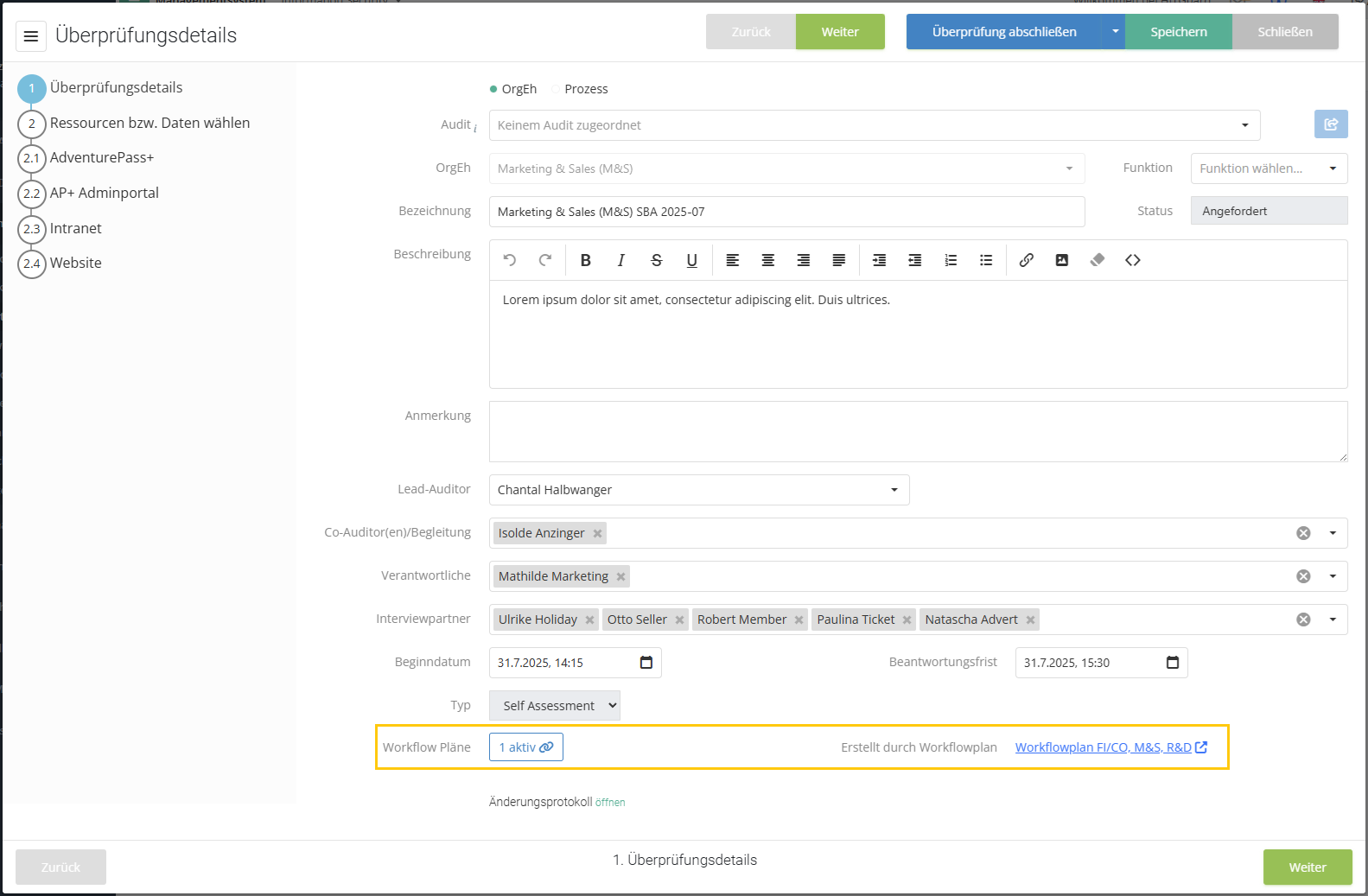
Information about any workflow plans to which the protection needs analysis is linked is also available directly in the protection needs analysis itself. This also shows whether it is active or paused there. If the protection needs analysis was created from a workflow plan, this is also displayed.
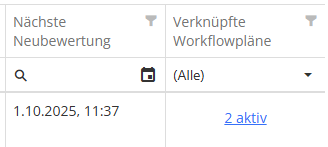
- Tip: You can also display information about whether a workflow is linked and when it will next be triggered in the overview of protection needs analyses by selecting the new column "Linked workflow plans" and „Next reassessment“.


You can find more information about workflow plans here.
Templates for naming protection needs analyses
Another new feature in this context is the configuration of naming templates for protection needs analyses under Risk management > Settings. A template can be created from the elements OrgUnit/Process, Date, Free text, and Separator, which is then used to name all new assessments.
- Example: Human Resources (HR) | SBA | 2025-08
Announcement: For upcoming releases, we plan to gradually expand the workflow plan feature to include additional entities: Risk, Gap Analysis and Review result, and Processing activity.
New KPI "Risks/opportunities over time"
For risk management, we have implemented the new "Risks/opportunities over time" key figure, which allows you to visualize the development of a risk/opportunity to date at the touch of a button.
Each risk/opportunity displayed is shown with its own development line, and the time period itself can be adjusted using the slider below the graph – just like the data filter for the control KPIs. Optionally, the background of the key figure can be colored using the colors of the risk matrix to identify the criticality of the various risks/opportunities even more quickly.

The KPI is not part of the risk management dashboard by default, but can be added to a dashboard by dragging and dropping it from the list of available KPIs.
Transfer of justifications for revaluations of gap analyses and review results
Previously, when revaluating review objects, the answers (Yes, No, Partially, or the selected maturity level) could be transferred from the old to the new review. From now on, the reason entered can also be transferred using a new checkbox in the dialog. The familiar placeholder "Reason for last review still applies" is still available.
The option is available both when creating new assessments using the button in the overview list and in step 2 of the gap analyses when adding review objects.

New feature in the semi-automatic revaluation of gap analyses and review results
If you create a semi-automatic reassessment for multiple review objects from different reviews, these can be linked to different organizational units. HITGuard now creates a reassessment for each cluster of review objects that are linked to the same organizational unit. The revaluation is thus still assigned to the organizational unit, and these revaluated results can be taken into account in the evaluations by organizational unit.
Example: Measures have been completed that have a positive effect on gaps from review objects at TogetherExample AG, the HR department, and the R&D department. HITGuard now creates not one semi-automatic reassessment, but three: one for each organizational unit that contains the respective review objects.
Pre-assigning participants for gap and protection needs analyses
When creating gap and protection needs analyses and also when recording review results, those responsible and interview partners are now preassigned via the organizational units or processes. The users who are stored as responsible persons in the organizational unit or process are used for this purpose.
Extension of risk reports to include threats and monetary impacts
In the risk and opportunity reports, it is now possible to include the threats associated with the risk or opportunity in the report. In addition, any monetary impacts specified are also printed in the report – once summarized in the overview and then individually for each risk/opportunity.
New measurement of RTO/RPO in the structural analysis and in the report
Previously, the target and actual RTO and RPO were measured in the structure analysis by only including elements that were displayed. This behavior has now been changed so that elements are no longer viewed in isolation, but rather in their entirety across all relationships.
- Example: I am in the organization view as the main view and have displayed the resources as a secondary view, which shows me the application level. The gross recovery time is the result of all linked resources below, including those that I have not displayed.
The entire path is also taken into account in the structural analysis reports.
NEW IN SUPPLIER RISK MANAGEMENT
Extension of supplier management
Supplier categories
Categories can now also be entered for suppliers. This makes them easier to filter and sort. The categories can be created separately or added directly when editing the supplier.


Master data and evaluation
Supplier master data has been expanded to include supplier ratings. Here, you can record the score assigned, the protection needs class assigned, and your own metrics from third-party systems. Categories are also assigned or created here. Finally, it is also possible to enter a reason for the ratings assigned.

Expiration date and response deadlines
HITGuard now also warns you if there is a conflict between the response deadline for a supplier review and the expiration date of the corresponding supplier. If you request a response with a deadline that is after the expiration date or set an expiration date that is before a deadline, the system will notify you and you can adjust the data if necessary.

Suppliers in the structural analysis
If the add-on is activated, suppliers are now also included in the structural analysis. Here they can be displayed as the main or secondary view and linked to other entities.


This allows you to visualize supplier risks and their protection needs with all their relationships and dependencies. The behavior is therefore identical to the behavior of other views.
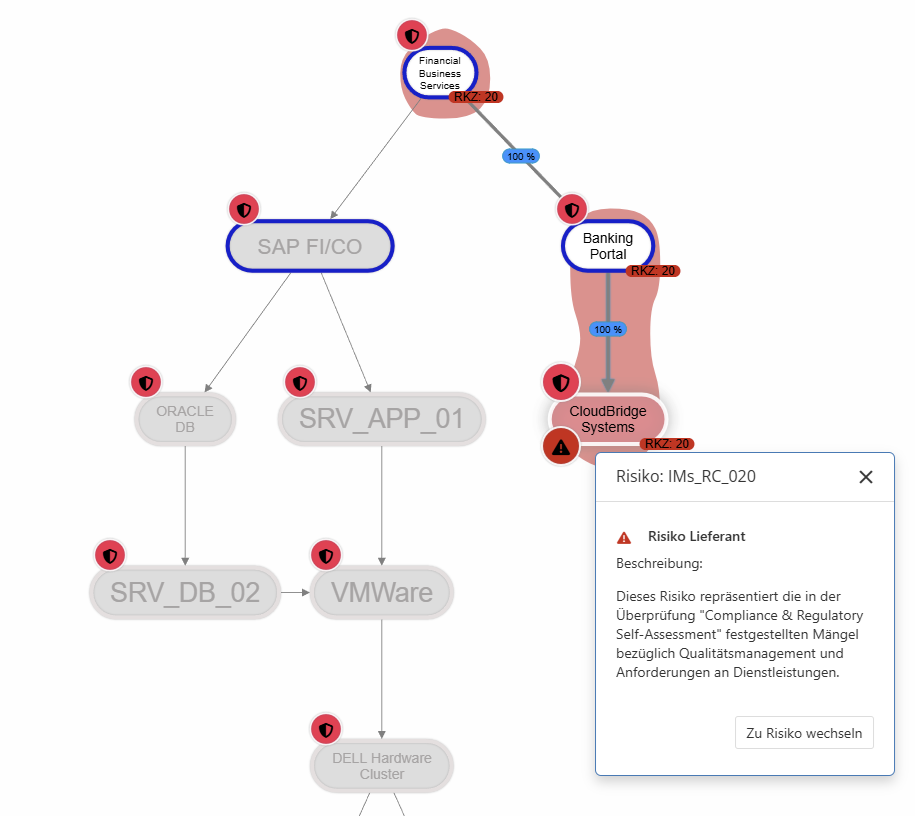
- Example: This allows systems used in the company to be visualized directly in relation to their suppliers.

You can find more information on structural analysis here.
Self assessments and interviews for suppliers
With this release, you can now create interviews for supplier evaluations in addition to self assessments. This allows you to incorporate the results of a review yourself and avoid sending a request for a response to the supplier user if this is more in line with your process.

Easier identification of locked users
If a supplier user tries to log in too many times with the wrong password, they will be locked out. This lockout is displayed to the supplier risk manager under Administration > Suppliers. As soon as the user has unlocked their account using the "Forgot password?" link, the badge disappears from the overview.

NEW IN AUDIT MANAGEMENT
New "Appointments" page in the audit
There is an important new feature under Audit Management > Audit planning > Audits: the "Reviews" and "Schedule" pages have been merged in the audit and replaced by the new "Appointments" page, which combines the two tabs.
This new page shows a combined view of the audit calendar (with all dates, including other) and the assigned reviews as a list. If you select a review in the overview list, it is highlighted in the calendar with a bright border.

Download all appointments for an audit
Starting with this release, all appointments belonging to an audit can be downloaded at once and imported into a calendar as appointments or meetings.

This option is available in the audit calendars as well as on the new appointments page in the audit.
Extension of the audit report to include the score in numbers
In the audit report, the overall score of the audit is now displayed not only graphically as a score line, but also as part of the table of header data for the audit. At the same time, the score is highlighted in color so that you can quickly see how the audit performed.

Update of the OrgUnit filter when creating audits
The filter options "OrgUnit not audited in the last X years" and "Suggest auditing this OrgUnit in every audit program" have been harmonized across the various call locations (audit calendar, etc.). All audits of the current management system always serve as the data basis for filtering.
The first filter, "OrgUnit not audited in the last X years," grays out all OrgUnits that have been audited in the last X years. With the second filter, "Suggest auditing this OrgUnit in every audit program," every OrgUnit that has been checked in the audit information (under Administration > OrgUnits) and has not yet been used in the currently assigned audit program can be selected.

A detailed explanation with examples can be found here.
NEW IN MEASURES & CONTROLS
New control type "Detective"
There is a new type of control parallel to preventive and corrective: detective. This type is intended for control definitions that are used to initially detect problems rather than prevent or correct them. The new control type is integrated into all KPIs and is also included in the reports.


Pre-assigning the person responsible for measures from the risk
When a new measure is created in the context of a risk, its responsible person is preset as the person responsible for the risk, but can be adjusted manually.
NEW IN DATA PROTECTION
External documents in the overview
If documents are stored for an external party in data protection, this information can now also be viewed in the overview of external parties. This makes it possible to quickly gain an overview of where documents are available and where they may still need to be created or uploaded. The column is displayed by default, but can be hidden at any time via the column selection.
NEW IN DOC MANAGEMENT
Keyword tagging of stored documents
Documents stored in document management can now be tagged with keywords. This simplifies searching and filtering documents and allows for even more structure in the storage of files and links.
Keywords can be created and managed under Doc management > Documents | Keywords. In addition, keywords can also be created directly when editing a document entry and added to the collection.


Simultaneous download of multiple items
We have expanded the download options in document management so that downloads are no longer limited to individual documents. It is now possible to download an entire folder and its subfolders or select multiple documents for download. When you do this, you will receive a zip file containing all selected items. Links are listed in a .txt file that is downloaded.

Advanced search/filtering in document management
Document management now offers a new advanced search option. This allows documents to be searched not only by their file name, but also by their keywords and the linked chapters of standards/norms. In addition to the current folder, this search also searches all its subfolders.

GENERAL
Extended functionality for archive reports
When creating a report with revision information in the report archive, the data classification can now not only be entered manually, but also selected from a drop-down menu. The data classes defined in the risk policy are available for selection.
If you create a report with revision information in the report archive as a PDF, the version number is automatically incremented. For example, the third PDF report created for a particular audit would automatically have the revision number 3.
New standards available
The following new standards are available in HITGuard with this update:
- NIS-2 IT Act - Annex to Implementing Regulation (EU) 2024/2690
- DORA - Digital Operations Resilience Act
- C5:2020 - Cloud Computing Criteria Catalog
You can import these standards under Administration > Standards and norms.
The BSI IT-Grundschutz has been expanded to include chapter CON.11.2.
EN ISO/IEC 27001:2022 has been expanded to include chapter DE: 6.3 Planning changes.
The following standards have been corrected in their short titles (no changes to content) for standard-specific report evaluations:
- EN ISO/IEC 27017:2015
- EN ISO/IEC 27002:2022
- EN ISO/IEC 27002:2013
- EN ISO/IEC 27001:2013
- EN ISO 50001:2018
- EN ISO 9001:2015-11
- EN ISO 9000:2015-11
- EN ISO 45001:2023-12
- EN ISO 14001:2015
- EN IEC 62443-3-3:2019
New mappings in existing standards
The following mapping has been corrected in EN ISO/IEC 27001:2022: Chapter 8.1 27001 now refers to chapters 45, 46, 47, 48 KRITIS catalog of measures. Previously, this mapping originated from chapter A.8.1. 27001.
EN ISO/IEC 27001:2022 now contains outgoing mappings to the following standards:
- VDA ISA 6.0
- ISO 27002:2022
- DORA - Digital Operations Resilience Act
- NIS-2 IT Act - Annex to Implementing Regulation (EU) 2024/2690
- C5:2020 - Criteria catalog for cloud computing
Mappings have been used either by standards developers or other official mappings. Despite careful implementation and extensive testing, errors cannot be ruled out. Furthermore, such mappings always serve as a guide. In individual cases, actual and complete compliance should be reviewed separately.