
HITGuard Release November 2025
Weitere Optionen
NEW FEATURE: AI SUPPORT
Starting with this release, HITGuard offers artificial intelligence support in several areas of the application. If your organization has a user account with an AI provider (currently OpenAI and Azure OpenAI are supported), it can be integrated with HITGuard and its functions can be used in HITGuard. Wherever there is an HTML editor, i.e., a text field in which you can also format text, you will find the new button for AI support.

Configuring AI support in the Global settings
AI integration is configured for the first time under Administration > Global Settings. You can choose between the providers OpenAI and Azure OpenAI and then enter the model you use and details for authentication. Once this is done, you can let artificial intelligence assist you in your work in HITGuard.
AI support is then always available for EExperts and Professionals of the management systems, and you can also configure whether these features should also be available to Practitioner users and/or supplier users (in the course of requested self assessments).
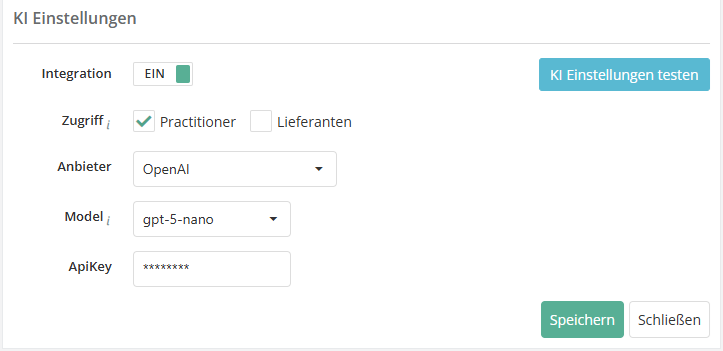
- Example: the screenshot shows the integration settings when selecting OpenAI as the AI provider. Selecting Azure OpenAI leads to different fields.

You can find more information about configuring the AI settings here.
Special feature: AI in the gap analysis
We offer an advanced AI support function for the gap analysis and the recording of free review results. The AI helps to generate the reasoning behind the answer to the question. The reformulated prompt, which you can also edit, combines the information from the question, the description text for the question, and the answer and reasoning for the answer, if an entry has already been made. The generated text can be copied or pasted directly into the reasoning field (Replace) at the touch of a button.


NEW IN RISK MANAGEMENT
New features in the gap analysis and review results
Following the introduction of workflow planning for protection needs analyses in the previous release, this version now includes workflow planning for gap analyses and review results. This means that all reviews that need to be reassessed on a recurring (or even one-off) basis can now be scheduled quickly and efficiently using automated planning.
Workflow planning for automated reassessments of gap analyses and review results
Under Risk Management > Vulnerabilities, there is a new option to create workflow plans. This allows gap analyses (GAs) and review results (RRs) to be automatically created as self assessments on a recurring basis and sent to the interview partner. There is a new button for this (purple, far right) that takes the user to an overview of the workflows that have been created.


Once there, you can create a new workflow plan with the plus button, copy an existing one with the copy button, or open an existing one with a double-click. It may be useful to divide GAs/RRs into several workflow plans so that they can be reevaluated throughout the year, e.g., some in the spring and some in the fall. For example, if you have created a workflow plan for supplier evaluation for the summer and one for the winter, which are repeated annually, and you want to invite a particularly sensitive supplier twice a year (in summer and winter) to repeatedly answer questionnaires on specific topics, you can assign the GA/RR for this supplier to both workflow plans.
As with a control definition and exactly as with the workflow for protection needs analyses, the next execution and the repetition behavior of the workflow are specified in the master data in the definition.

In the Reviews tab, the desired initial GAs/RRs are added, on the basis of which the reassessments are to be created. If there are conflicts, this is indicated by a yellow or red warning triangle and the problem is described so that the conflict can be resolved or the workflow adjusted accordingly.
You can find more information about possible conflicts here.
When assigning the reviews, you also have the option of selecting which knowledge base version should be used for the reassessment and whether and how the results of the previous review should be transferred.

At this point, you also have the option of immediately triggering a manual reassessment of the GA/RR by using the same button as in the overview under Risk management > Vulnerabilities (arrow button on the far right).

One week before the workflow is executed, the person responsible receives a reminder e-mail with all the important information, including any problems. This gives them enough time to resolve conflicts, such as closing GAs that have been forgotten.
When the workflow is triggered, the person responsible also receives information about what has happened. This means they receive information about successful mailings as well as mailings that were not possible due to unresolved conflicts. This information can then also be found in the Completed workflows tab.
Workflows can also be paused for individual reviews. This can be useful if, for example, you have carried out an unscheduled reassessment shortly before triggering the workflow plan and do not want to send out a new request immediately. In this case, a trigger is skipped and the GA or RR is only included in the workflow again when the next trigger occurs. If the workflow can be executed without any problems and is not paused, a new GA or RR is created as a self assessment, with or without the results of the previous version, depending on the configuration, and sent directly to the interview partner. The start date is the current date of dispatch, and the response deadline is based on the deadline or end date of the GA/RR that served as a template. The requested GA/RR can now be answered and returned by the interview partner like any other self assessment.

Workflow information in the gap analysis and in the review result
Information about any workflow plans linked to the GA/RR is also available directly in the gap analysis/review result itself. This also shows whether the workflow plan is active or suspended, or whether the check for execution in the workflow plan is paused once. If the GA/RR was created from a workflow plan, this is also displayed.
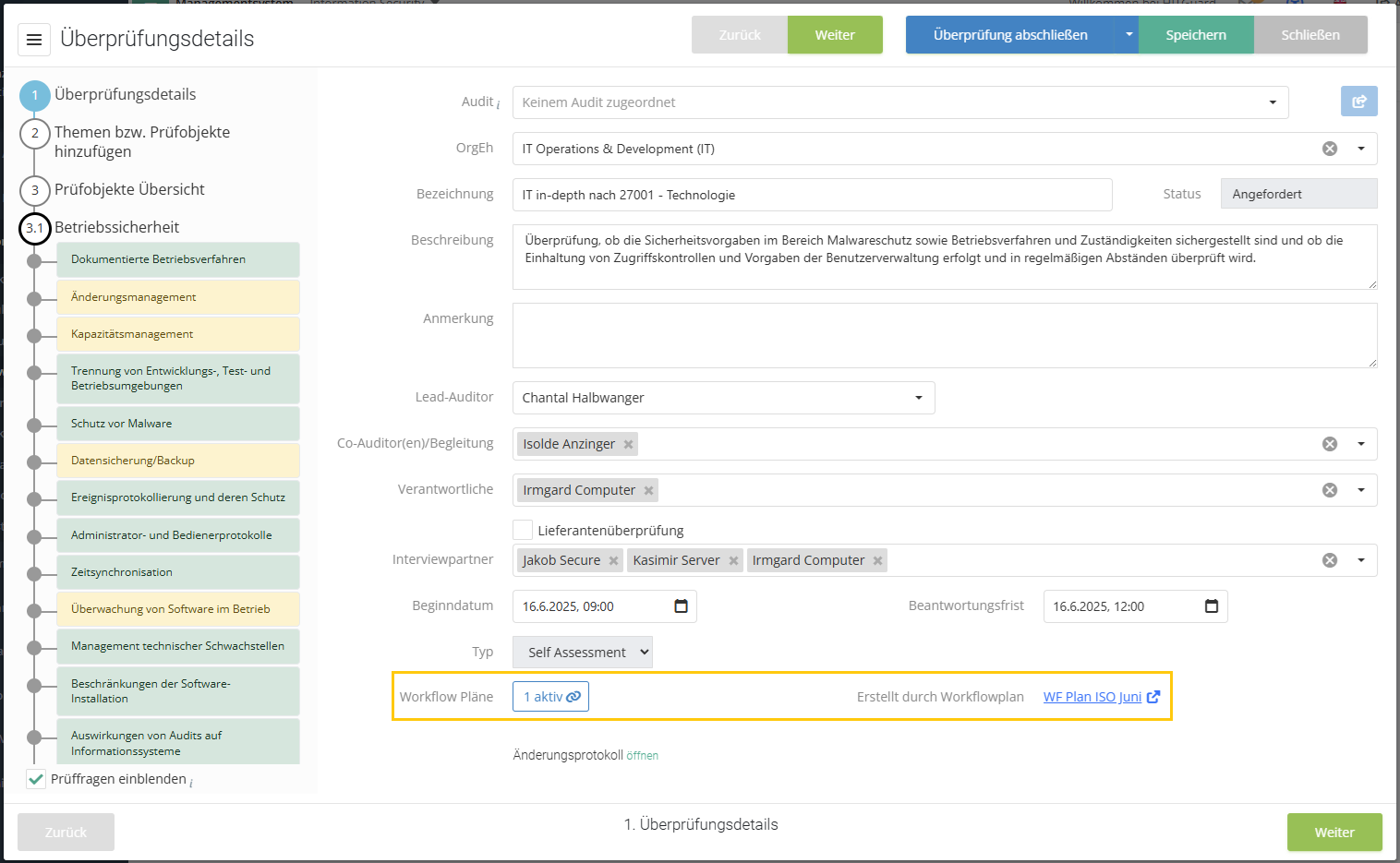
- Tip: To find out whether a workflow is linked and when it will next be triggered, you can also display the new column "Linked workflow plans" in the overview of gap analyses.
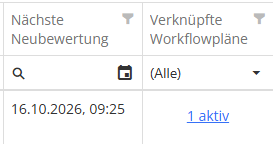


You can find more information about workflow plans here.
New model segment for resources: Business Service Level
In response to repeated customer requests, we now offer the option of modeling business services in addition to applications. For resource management in HITGuard, there is now a new model segment level: Business Service Level. Located above the application level, resources from this new level are also made available in the protection requirement analysis by default.

As of this release, there is another new feature for the protection needs analysis under Risk management > Settings. Here, you can now manually configure which model segment resources should be available for the protection needs analysis.

In the screenshot above, the IT infrastructure level has been activated in addition to the standard model segments (Business Service Level and Application Level). In the protection needs analysis, you will then be offered resources from the selected model segments for selection, even as a Practitioner.

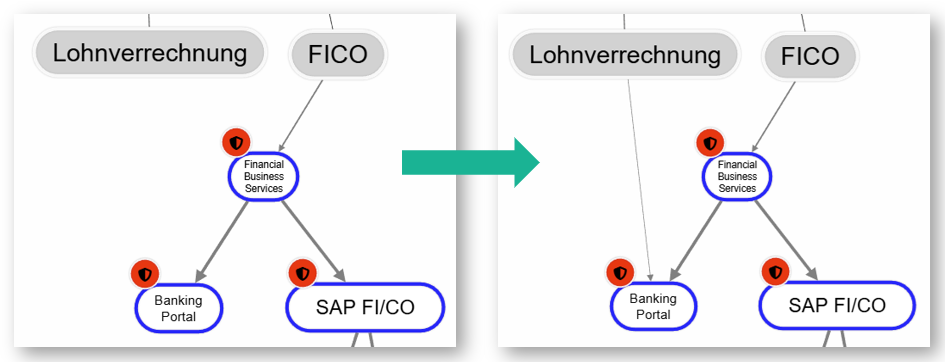
This means that protection needs analysis assessments and relationships at different levels can arise in the structural analysis. The resources always inherit the highest protection need from their relationship chain. This means that even if they were classified as less critical in a protection needs analysis, they can inherit more critical assessments due to requirements from higher-level resources via the relationship to them.
- Example: The BankingPortal application (resource at the application level) has inherited a high protection need for availability from its relationships to the higher-level Financial Business Service (resource at the business service level). The payroll team in the FICO department has now been invited to evaluate how important this specific application is to them. In this analysis, the BankingPortal is classified as not critical at all in terms of availability, and a new relationship is created in the structural analysis between the department and the resource. Nevertheless, the protection requirement for the app remains high. It inherits the protection need from the business service, which was rated as critical in terms of availability in one or more protection needs analyses with other departments. As usual, the inheritance of protection needs is based on the maximum principle of all incoming dependency relationships.

Filter option by OrgUnits for more KPIs
The two risk management KPIs "Active risks/opportunities and their treatment" and "Risks/opportunities by status" have been expanded to include the option of filtering them by organizational units, as is the case with many other KPIs in the area of risk management. Which organizational units are available and which risks are then displayed for them always results from the linking of structural elements of the risk. These are the affected organizational units, resources, etc., which can be found on the master data page of the risk under affected structural elements.
NEW IN SUPPLIER RISK MANAGEMENT
Anonymization of supplier users
As with regular HITGuard users, it is now also possible to anonymize supplier users when deactivating them. HITGuard offers this automatically when you deactivate a user.

If you agree, the user's data is anonymized and the last name is changed to a random sequence of letters. Anonymized supplier users can also be deleted as long as they were not verified before anonymization.

Report printout for suppliers
Suppliers now also have the option of printing out or saving self assessments shared with them in report form. A pink "Generate report" button has been added to the folders in the supplier portal for this purpose. The report can only be created as a PDF and contains the name, description, status, and response deadline, as well as a complete list of the review questions with the assigned answers, including justifications.

Suppliers in KPIs and reports
The KPIs for risks and opportunities in risk management and the KPIs for gap analyses and determination types in risk and audit management have been expanded to include checkboxes and selection fields that can be used to limit the information displayed to that which relates directly to suppliers. Individual suppliers can also be selected.
A supplier risk or supplier opportunity is one that is linked to at least one structural element of the type "supplier."


There are also new filter options for the related reports. In the Risk management > Risk > General report, suppliers can be selected from the structural elements and a risk report can be generated for all risks associated with them. In the reports on reviews (Risk Management > Gap analysis, Risk management > Conformity by reviews, and Audit management > Review protocol > Gap analysis), a new column has been added that can be used to filter whether it is a supplier evaluation.
NEW IN MEASURES & CONTROLS
Marking of suspended measures when requesting progress reports
When requesting progress reports on measures, open and often suspended measures are always available. To make it easier to filter out suspended measures if you do not want to request a progress report for them or are currently collecting progress data for them, measures with the status "Suspended" are now marked with their own icon. All suspended measures now display an orange triangle next to their request status.

NEW IN DATA PROTECTION
New view in the processing register
A new view has been implemented under Data protection > Processing register: in addition to a list of existing processing activities (PAs) (pre-filtered to current versions), you will now also find a display in which the PAs are assigned to the PA-responsible organizational unit (internal) or, for example, customers (external). This tree view overview of the PAs responsible allows you to quickly view the PAs assigned to the organizational units or external parties.
For each organizational unit and each external party in data protection, the number of current PAs assigned to it and the nodes below it is displayed in parentheses. If you click on an organizational unit or an external party, the list is also limited to this selection.

You can switch back to the usual list view without a tree structure at any time.

You can find more information about processing activities here.
Datenkategorien als „obsolet“ markieren
In den VTs, in denen diese Datenkategorien bereits genutzt werden, stehen sie natürlich weiterhin zur Verfügung. Ziel ist es, diese obsoleten Datenkategorien dann über die Zeit bei Aktualisierungen auszutauschen bzw. nicht versehentlich nochmals bei neuen VTs zu verwenden.


Verwendung mehrerer Modellsegmente in der Verarbeitungstätigkeit
Ressourcen auf der neuen Modellsegment-Ebene Business Service Ebene stehen nun automatisch auch in Verarbeitungstätigkeiten (VTs) bei den Betriebsmitteln zur Auswahl. Zusätzlich kann man unter Datenschutz > Einstellungen auch manuell konfigurieren, Ressourcen welcher Modellsegmente als Betriebsmittel in der VT verwendet werden können sollen.

In der VT finden sich die Betriebsmittel in Schritt 6 „Weitere Angaben“. Dort können nun – auch von Practitionern – Elemente aller gewählten Modellsegmente selektiert werden.

Erfassung der rechtlichen Verpflichtung zu Betroffenenkategorien in der Verarbeitungstätigkeit
Unter Datenschutz > Einstellungen kann man mit einer neuen Checkbox konfigurieren, ob im Schritt 2 der Verarbeitungstätigkeit (VT) zu den Betroffenenkategorien auch die rechtliche Verpflichtung erfasst werden soll. Ist dies aktiviert, kann man neben der Bezeichnung und der Rechtmäßigkeit der Verarbeitung auch die Rechtliche Verpflichtung in Form eines Norm-Mappings festhalten. D.h. man kann ein oder mehrere Paragrafen bzw. Artikel eines Gesetzes oder einer Norm mit der dokumentierten Rechtmäßigkeit der Verarbeitung verknüpfen.

Ist die Option aktiviert und ist die Rechtliche Verpflichtung ausgefüllt, dann wird sie auch im VT-Bericht und im DSFA-Bericht angedruckt.
Anzeige der Verarbeitungstätigkeiten-Verknüpfungen bei Externen
Ein Klick auf den Linktext öffnet ein Dialogfenster, in dem die VT aufgelistet werden und wann sie verknüpft wurden.

ALLGEMEINES
Import von Lieferanten
Die Importfunktion unter Administration > Datenimport wurde so erweitert, dass jetzt auch Stammdaten zu Lieferanten einfach und schnell per Excel importiert werden können. Dabei können neben Stammdaten wie Kürzel, Bezeichnung und einem etwaigen Ablaufdatum auch die Anschrift, der Kontakt und Teile der Lieferantenbewertung importiert werden. Lieferantenbenutzer müssen weiterhin manuell angelegt werden.

Eine Importvorlage für Lieferanten und weitere Details finden Sie hier.
Import von Maßnahmen
Die Importfunktion unter Administration > Datenimport wurde weiters so erweitert, dass jetzt auch Maßnahmen einfach und schnell per Excel importiert oder aktualisiert werden können.

Eine Importvorlage für Maßnahmen und weitere Details finden Sie hier.
Import von RTO und RPO bei Ressourcen
Eine neue Version der Importvorlage für Ressourcen finden Sie hier.
Erweiterung der REST API
Die in 6.1 bis 6.3 beschriebenen neuen Importfunktionen stehen auch in der REST API zur Verfügung.
Neue Normen verfügbar
Die folgenden neuen Normen sind mit diesem Update in HITGuard verfügbar:
- EN ISO 37001:2025 - Anti-bribery management systems — Requirements with guidance for use
- EN ISO 37301:2021 - Compliance management systems — Requirements with guidance for use
- EN ISO/IEC 27019:2024 - Information security, cybersecurity and privacy protection — Information security controls for the energy utility industry
- EN ISO/IEC 42001:2023 - Information technology — Artificial intelligence — Management system (ISO/IEC 42001:2023)
- EN ISO 13485:2021 - Medizinprodukte - Qualitätsmanagementsysteme - Anforderungen für regulatorische Zwecke (ISO 13485:2016); Deutsche Fassung EN ISO 13485:2016 + AC:2018 + A11:2021
- KDR-OG - Kirchliche Datenschutzregelung der Ordensgemeinschaft päpstlichen Rechts (KDR-OG)
Sie können diese Normen unter Administration > Standards und Normen importieren.
Neue Mappings in bestehenden Normen
Der Standard EN ISO/IEC 27001:2022 erhält neue ausgehende Mappings zum Standard EN ISO/IEC 27019:2024.
Neue Bezeichnung bestehender Normen
Die Norm „NIS-2 IT-Act“ heißt jetzt mit kurzem Namen „NIS-2 DVO Anhang (IT-Act)“ und mit langem Namen „Anhang der Durchführungsverordnung (EU) 2024/2690 (NIS-2 IT-Act)“.