
HITGuard Release November 2025/en: Unterschied zwischen den Versionen
Weitere Optionen
Isan (Diskussion | Beiträge) Die Seite wurde neu angelegt: „===New standards available=== The following new standards are available in HITGuard with this update: *'''EN ISO 37001:2025''' - Anti-bribery management systems — Requirements with guidance for use *'''EN ISO 37301:2021''' - Compliance management systems — Requirements with guidance for use *'''EN ISO/IEC 27019:2024''' - Information security, cybersecurity and privacy protection — Information security controls for the energy utility industry *'''EN…“ |
Isan (Diskussion | Beiträge) Die Seite wurde neu angelegt: „===New name for existing standards=== The norm „NIS-2 IT-Act“ is now named „NIS-2 DVO Anhang (IT-Act)“ in short form and „Anhang der Durchführungsverordnung (EU) 2024/2690 (NIS-2 IT-Act)“ in long form.“ |
||
| Zeile 160: | Zeile 160: | ||
The EN ISO/IEC 27001:2022 standard receives new outgoing mappings to the EN ISO/IEC 27019:2024 standard. | The EN ISO/IEC 27001:2022 standard receives new outgoing mappings to the EN ISO/IEC 27019:2024 standard. | ||
===New name for existing standards=== | |||
The norm „NIS-2 IT-Act“ is now named „NIS-2 DVO Anhang (IT-Act)“ in short form and „Anhang der Durchführungsverordnung (EU) 2024/2690 (NIS-2 IT-Act)“ in long form. | |||
Version vom 24. November 2025, 11:48 Uhr
NEW FEATURE: AI SUPPORT
Starting with this release, HITGuard offers artificial intelligence support in several areas of the application. If your organization has a user account with an AI provider (currently OpenAI and Azure OpenAI are supported), it can be integrated with HITGuard and its functions can be used in HITGuard. Wherever there is an HTML editor, i.e., a text field in which you can also format text, you will find the new button for AI support.

Configuring AI support in the Global settings
AI integration is configured for the first time under Administration > Global Settings. You can choose between the providers OpenAI and Azure OpenAI and then enter the model you use and details for authentication. Once this is done, you can let artificial intelligence assist you in your work in HITGuard.
AI support is then always available for EExperts and Professionals of the management systems, and you can also configure whether these features should also be available to Practitioner users and/or supplier users (in the course of requested self assessments).
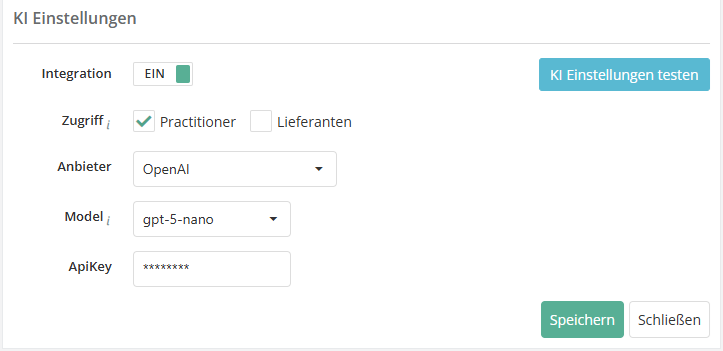
- Example: the screenshot shows the integration settings when selecting OpenAI as the AI provider. Selecting Azure OpenAI leads to different fields.

You can find more information about configuring the AI settings here.
Special feature: AI in the gap analysis
We offer an advanced AI support function for the gap analysis and the recording of free review results. The AI helps to generate the reasoning behind the answer to the question. The reformulated prompt, which you can also edit, combines the information from the question, the description text for the question, and the answer and reasoning for the answer, if an entry has already been made. The generated text can be copied or pasted directly into the reasoning field (Replace) at the touch of a button.


NEW IN RISK MANAGEMENT
New features in the gap analysis and review results
Following the introduction of workflow planning for protection needs analyses in the previous release, this version now includes workflow planning for gap analyses and review results. This means that all reviews that need to be reassessed on a recurring (or even one-off) basis can now be scheduled quickly and efficiently using automated planning.
Workflow planning for automated reassessments of gap analyses and review results
Under Risk Management > Vulnerabilities, there is a new option to create workflow plans. This allows gap analyses (GAs) and review results (RRs) to be automatically created as self assessments on a recurring basis and sent to the interview partner. There is a new button for this (purple, far right) that takes the user to an overview of the workflows that have been created.


Once there, you can create a new workflow plan with the plus button, copy an existing one with the copy button, or open an existing one with a double-click. It may be useful to divide GAs/RRs into several workflow plans so that they can be reevaluated throughout the year, e.g., some in the spring and some in the fall. For example, if you have created a workflow plan for supplier evaluation for the summer and one for the winter, which are repeated annually, and you want to invite a particularly sensitive supplier twice a year (in summer and winter) to repeatedly answer questionnaires on specific topics, you can assign the GA/RR for this supplier to both workflow plans.
As with a control definition and exactly as with the workflow for protection needs analyses, the next execution and the repetition behavior of the workflow are specified in the master data in the definition.

In the Reviews tab, the desired initial GAs/RRs are added, on the basis of which the reassessments are to be created. If there are conflicts, this is indicated by a yellow or red warning triangle and the problem is described so that the conflict can be resolved or the workflow adjusted accordingly.
You can find more information about possible conflicts here.
When assigning the reviews, you also have the option of selecting which knowledge base version should be used for the reassessment and whether and how the results of the previous review should be transferred.

At this point, you also have the option of immediately triggering a manual reassessment of the GA/RR by using the same button as in the overview under Risk management > Vulnerabilities (arrow button on the far right).

One week before the workflow is executed, the person responsible receives a reminder e-mail with all the important information, including any problems. This gives them enough time to resolve conflicts, such as closing GAs that have been forgotten.
When the workflow is triggered, the person responsible also receives information about what has happened. This means they receive information about successful mailings as well as mailings that were not possible due to unresolved conflicts. This information can then also be found in the Completed workflows tab.
Workflows can also be paused for individual reviews. This can be useful if, for example, you have carried out an unscheduled reassessment shortly before triggering the workflow plan and do not want to send out a new request immediately. In this case, a trigger is skipped and the GA or RR is only included in the workflow again when the next trigger occurs. If the workflow can be executed without any problems and is not paused, a new GA or RR is created as a self assessment, with or without the results of the previous version, depending on the configuration, and sent directly to the interview partner. The start date is the current date of dispatch, and the response deadline is based on the deadline or end date of the GA/RR that served as a template. The requested GA/RR can now be answered and returned by the interview partner like any other self assessment.

Workflow information in the gap analysis and in the review result
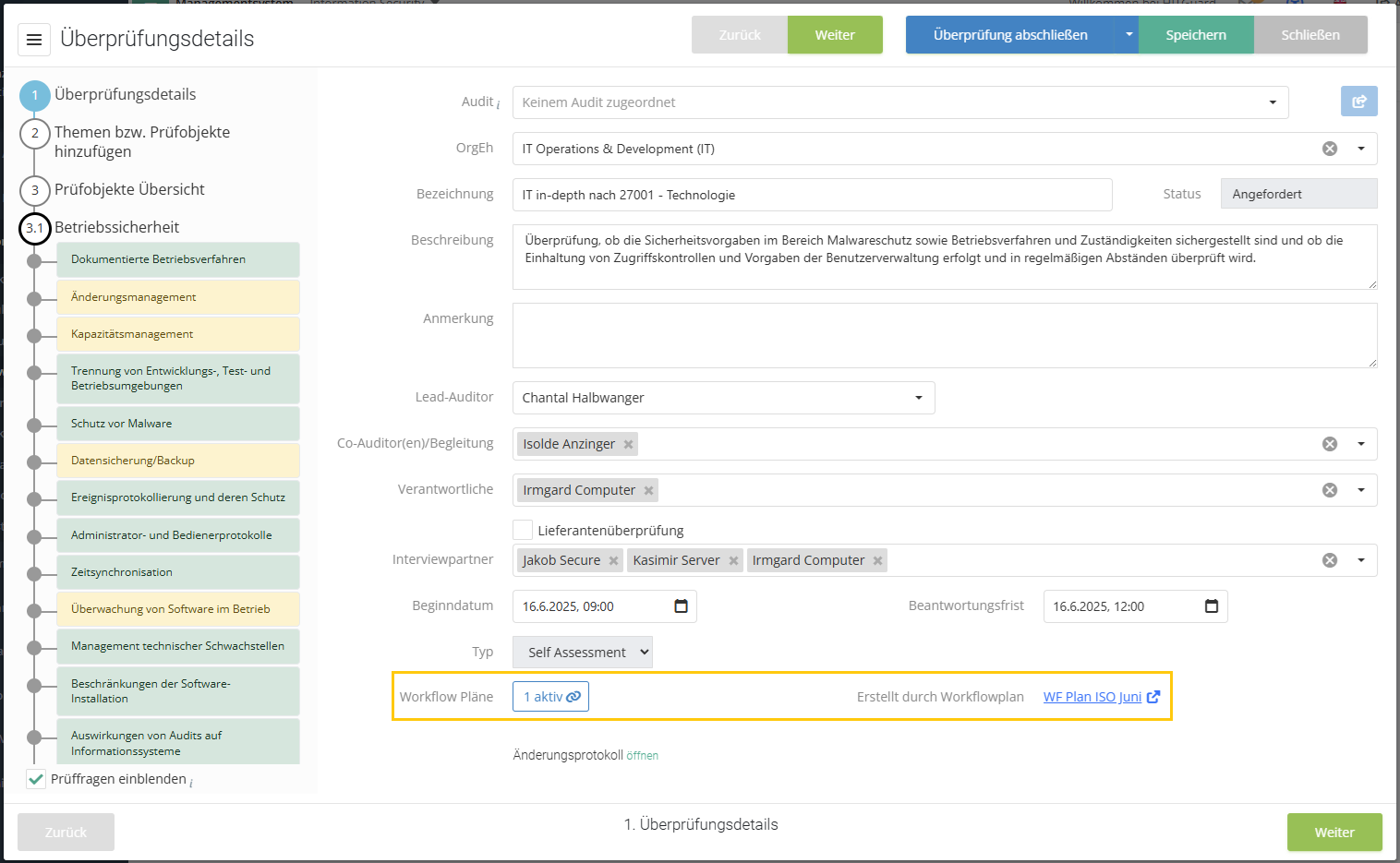
Information about any workflow plans linked to the GA/RR is also available directly in the gap analysis/review result itself. This also shows whether the workflow plan is active or suspended, or whether the check for execution in the workflow plan is paused once. If the GA/RR was created from a workflow plan, this is also displayed.
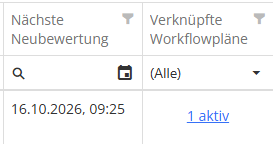
- Tip: To find out whether a workflow is linked and when it will next be triggered, you can also display the new column "Linked workflow plans" in the overview of gap analyses.


You can find more information about workflow plans here.
New model segment for resources: Business Service Level
In response to repeated customer requests, we now offer the option of modeling business services in addition to applications. For resource management in HITGuard, there is now a new model segment level: Business Service Level. Located above the application level, resources from this new level are also made available in the protection requirement analysis by default.

As of this release, there is another new feature for the protection needs analysis under Risk management > Settings. Here, you can now manually configure which model segment resources should be available for the protection needs analysis.

In the screenshot above, the IT infrastructure level has been activated in addition to the standard model segments (Business Service Level and Application Level). In the protection needs analysis, you will then be offered resources from the selected model segments for selection, even as a Practitioner.

This means that protection needs analysis assessments and relationships at different levels can arise in the structural analysis. The resources always inherit the highest protection need from their relationship chain. This means that even if they were classified as less critical in a protection needs analysis, they can inherit more critical assessments due to requirements from higher-level resources via the relationship to them.
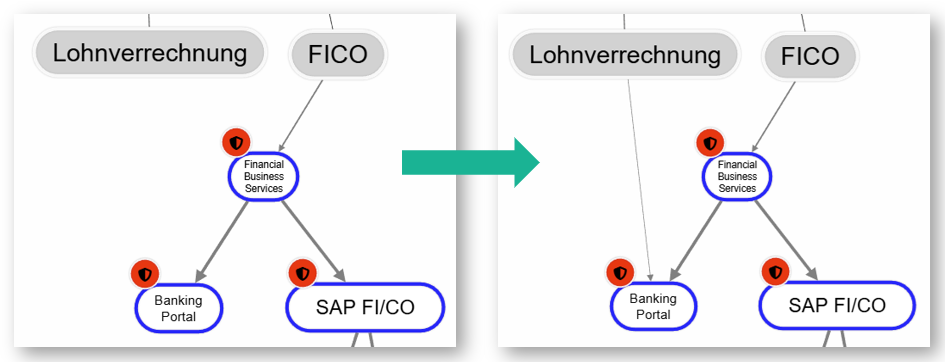
- Example: The BankingPortal application (resource at the application level) has inherited a high protection need for availability from its relationships to the higher-level Financial Business Service (resource at the business service level). The payroll team in the FICO department has now been invited to evaluate how important this specific application is to them. In this analysis, the BankingPortal is classified as not critical at all in terms of availability, and a new relationship is created in the structural analysis between the department and the resource. Nevertheless, the protection requirement for the app remains high. It inherits the protection need from the business service, which was rated as critical in terms of availability in one or more protection needs analyses with other departments. As usual, the inheritance of protection needs is based on the maximum principle of all incoming dependency relationships.

Filter option by OrgUnits for more KPIs
The two risk management KPIs "Active risks/opportunities and their treatment" and "Risks/opportunities by status" have been expanded to include the option of filtering them by organizational units, as is the case with many other KPIs in the area of risk management. Which organizational units are available and which risks are then displayed for them always results from the linking of structural elements of the risk. These are the affected organizational units, resources, etc., which can be found on the master data page of the risk under affected structural elements.
NEW IN SUPPLIER RISK MANAGEMENT
Anonymization of supplier users
As with regular HITGuard users, it is now also possible to anonymize supplier users when deactivating them. HITGuard offers this automatically when you deactivate a user.

If you agree, the user's data is anonymized and the last name is changed to a random sequence of letters. Anonymized supplier users can also be deleted as long as they were not verified before anonymization.

Report printout for suppliers
Suppliers now also have the option of printing out or saving self assessments shared with them in report form. A pink "Generate report" button has been added to the folders in the supplier portal for this purpose. The report can only be created as a PDF and contains the name, description, status, and response deadline, as well as a complete list of the review questions with the assigned answers, including justifications.

Suppliers in KPIs and reports
The KPIs for risks and opportunities in risk management and the KPIs for gap analyses and determination types in risk and audit management have been expanded to include checkboxes and selection fields that can be used to limit the information displayed to that which relates directly to suppliers. Individual suppliers can also be selected.
A supplier risk or supplier opportunity is one that is linked to at least one structural element of the type "supplier."


There are also new filter options for the related reports. In the Risk management > Risk > General report, suppliers can be selected from the structural elements and a risk report can be generated for all risks associated with them. In the reports on reviews (Risk Management > Gap analysis, Risk management > Conformity by reviews, and Audit management > Review protocol > Gap analysis), a new column has been added that can be used to filter whether it is a supplier evaluation.
NEW IN MEASURES & CONTROLS
Marking of suspended measures when requesting progress reports
When requesting progress reports on measures, open and often suspended measures are always available. To make it easier to filter out suspended measures if you do not want to request a progress report for them or are currently collecting progress data for them, measures with the status "Suspended" are now marked with their own icon. All suspended measures now display an orange triangle next to their request status.

NEW IN DATA PROTECTION
New view in the processing register
A new view has been implemented under Data protection > Processing register: in addition to a list of existing processing activities (PAs) (pre-filtered to current versions), you will now also find a display in which the PAs are assigned to the PA-responsible organizational unit (internal) or, for example, customers (external). This tree view overview of the PAs responsible allows you to quickly view the PAs assigned to the organizational units or external parties.
For each organizational unit and each external party in data protection, the number of current PAs assigned to it and the nodes below it is displayed in parentheses. If you click on an organizational unit or an external party, the list is also limited to this selection.

You can switch back to the usual list view without a tree structure at any time.

You can find more information about processing activities here.
Marking data categories as "obsolete"
Data categories that are no longer required can now be marked as obsolete. This makes them read-only and grayed out in the overview, and they can no longer be assigned to new processing activities (PAs). All subcategories, if any, are also marked as obsolete.
In the PAs where these data categories are already in use, they will of course remain available. The aim is to replace these obsolete data categories over time during updates and to ensure that they are not accidentally used again in new PAs.


Use of multiple model segments in the processing activity
Resources at the new model segment level (Business Service Level) are now automatically available for selection in processing activities (PAs) for operating resources. In addition, under Data protection > Settings, you can also manually configure which model segment resources should be used as operating resources in the PA.

The operating resources can be found in the VT in step 6 "Further details." There, elements of all selected model segments can now be selected, even by Practitioners.

Recording the legal obligation to data subject categories in the processing activity
Under Data protection > Settings, a new checkbox can be used to configure whether the legal obligation should also be recorded in step 2 of the processing activity (PA) for the categories of data subjects. If this is activated, the legal obligation can be recorded in the form of a standard mapping in addition to the designation and the lawfulness of the processing. This means that you can link one or more paragraphs or articles of a law or standard to the documented lawfulness of the processing.

If the option is activated and the legal obligation is filled in, it will also be printed in the PA report and the DPIA report.
Display of processing activity links for external parties
External parties in data protection can be linked to processing activities (PAs) in various roles, as PA controllers or as recipients of data. In order to see these links not only on the PA side, but also to be able to quickly view them on the external party's side, they are now displayed for the external party. If you have opened an external party and they are linked to PAs, this is displayed as the link text "X links" at the top.
Clicking on the link text opens a dialog box listing the PAs and when they were linked.

GENERAL
Importing suppliers
The import function under Administration > Data import has been expanded so that master data for suppliers can now also be imported quickly and easily via Excel. In addition to master data such as codes, descriptions, and any expiration dates, the address, contact information, and parts of the supplier evaluation can also be imported. Supplier users must still be created manually.

An import template for suppliers and further details can be found here.
Importing measures
The import function under Administration > Data import has been expanded so that measures can now also be imported or updated quickly and easily via Excel.

An import template for measures and further details can be found here.
Importing RTO and RPO for resources
An additional extension of the import function can be found in the resources: here, RTO and RPO can now also be imported as an option. You can specify the times in either hours or minutes; this must be decided when configuring the columns to be imported.
A new version of the import template for resources can be found here.
Extension of the REST API
The new import functions described in 6.1, 6.2, and 6.3 are also available in the REST API.
New standards available
The following new standards are available in HITGuard with this update:
- EN ISO 37001:2025 - Anti-bribery management systems — Requirements with guidance for use
- EN ISO 37301:2021 - Compliance management systems — Requirements with guidance for use
- EN ISO/IEC 27019:2024 - Information security, cybersecurity and privacy protection — Information security controls for the energy utility industry
- EN ISO/IEC 42001:2023 - Information technology — Artificial intelligence — Management system (ISO/IEC 42001:2023)
- EN ISO 13485:2021 - Medical devices - Quality management systems - Requirements for regulatory purposes (ISO 13485:2016); German version EN ISO 13485:2016 + AC:2018 + A11:2021
- KDR-OG - Kirchliche Datenschutzregelung der Ordensgemeinschaft päpstlichen Rechts (KDR-OG)
You can import these standards under Administration > Standards and norms.
New mappings in existing standards
The EN ISO/IEC 27001:2022 standard receives new outgoing mappings to the EN ISO/IEC 27019:2024 standard.
New name for existing standards
The norm „NIS-2 IT-Act“ is now named „NIS-2 DVO Anhang (IT-Act)“ in short form and „Anhang der Durchführungsverordnung (EU) 2024/2690 (NIS-2 IT-Act)“ in long form.